Python - Calling a Python script from Another Script
Calling a Python script from another script is a common way to modularize your code, reuse functionality, and improve code organization. This can be achieved by importing functions, classes, or variables from one script into another. When you import a script, the code within it is executed, and the objects defined in the script become available for use in the calling script.
Here's a high-level overview of the steps to call a Python script from another script:
- Organize your scripts: Make sure the scripts are in the same directory or in a directory listed in the Python import search path (sys.path). This ensures that Python can locate the script you want to import.
- Define functions, classes, or variables in the script to be called: In the script you want to call, define the functions, classes, or variables you want to use in the calling script. These objects should be defined at the top level of the script (outside of any functions or classes), so they are accessible when the script is imported.
Examples
You can call (run) another python script from your script. In this way, you can implement various functionalities in multiple different python script file and combine those functionalities.
Example 01 >

RunScript.py --------------------------------
import os
print("Running the script : test.py....\n")
os.system('python test.py')
test.py --------------------------------
print('Hello World')
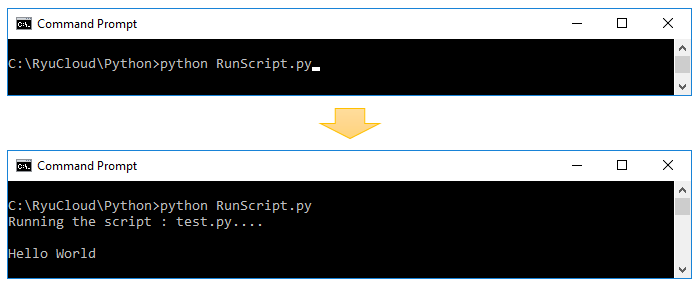
You can run the script and get the result as shown below.
Example 02 >
If you have difficulties in understanding RunScript.py due to sys.system(), see Python in Python :Calling Another Script
RunScript.py --------------------------------
import os
import sys
print("Running the script : ", sys.argv[1], "....\n")
os.system('python ' + sys.argv[1])
test.py --------------------------------
print('Hello World')
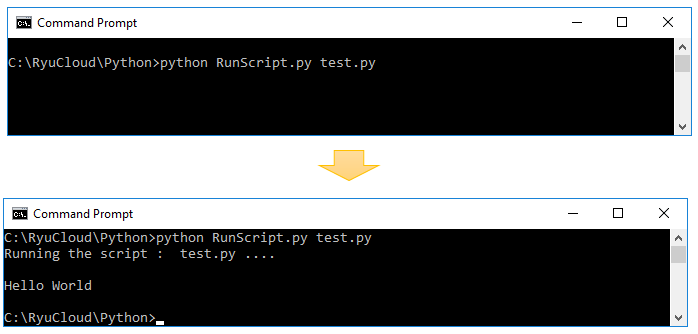
You can run the script and get the result as shown below.