This page is a first overview of WiFi, and the detailed pages build on it. WiFi is the family of wireless LAN technologies defined in IEEE 802.11 and certified by the Wi-Fi Alliance. I'll start with where the access point sits in a network. Then we'll go through the protocol stack from PHY up to IP. After that, the page covers the functions that run on top of the radio link: security, network management, QoS, roaming, and range. Each of these sections is short, and several of them link to a page that covers the topic in full.
- Overall Network Architecture
- Protocol Stack
- Security
- Network Management
- Quality of Service - QoS
- Roaming
- Range and Coverage
- Reference
- YouTube
Overall Network Architecture
Most common way of using WLAN would be like as follows. In most case, the main communication line would be wired line and we connect AP(Access Point) to the wired backbone as shown below. Access Point is a device that communicate with the client device (e.g, Laptop or Smart phone) and convey the data through the wireline backbone. Access point has two different interface with it, one for connecting to wired backbone using wireline protocol and the other one for communicating to various mobile device using a wireless protocol.
When we say WLAN in terms of technology, it usually mean the technology being used to connect the mobile clients and Access Points in wireless communication method. The pages I will post will also be about those wireless communication technology between the mobile clients and an access point.
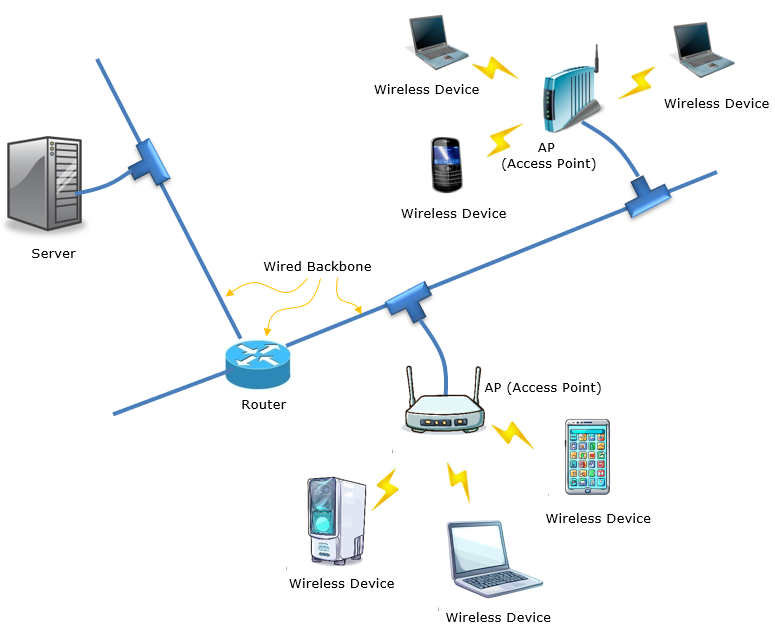
A WLAN (Wireless Local Area Network) is basically a setup that lets you connect your devices, like laptops, phones, or tablets, to the internet without using any cables. The main parts of a WLAN are the Access Points (APs), the wireless devices, and the wired backbone.
when you connect your device to the Wi-Fi, it talks to the APs, which then send your data through the wired backbone to wherever it needs to go. This setup lets you use the internet and share data without any cables, which is pretty convenient.
Protocol Stack
As the terminology implies, WLAN is also a kind of LAN (Local Area Network), so it use most part of the standard LAN protocol especially in higher layer. The only difference is very low layer parts (PHY and Low MAC). Most of the contents I will deal with will be about PHY/MAC part of the protocol stack.

The stack above draws the split in the purple boxes at the bottom. Everything from Network up to Application is common to WLAN and wired LAN. The Data Link Layer is split in two. The upper part, 802.2 Logical Link Control, is also shared with wired LAN, while the lower part carries the 802.11 MAC Header. The PHY carries the 802.11 PLCP Header and the radio medium itself, such as DSSS or OFDM. The labels on the right also tell you where 802.11a, b and g differ. They use an identical MAC header, but each has a distinct PLCP header, because each one uses a different radio.
Let's break it down in a more casual way, focusing on the Wi-Fi protocol stack and the three main layers: Physical (PHY), Media Access Control (MAC), and Internet Protocol (IP).
Physical Layer - PHY
The PHY layer is like the radio station of Wi-Fi. It takes care of turning your data into radio signals that can be sent through the air. Different Wi-Fi versions (like 802.11a, b, g, n, ac, and ax) use different methods and radio frequencies to send data at different speeds and distances. It also has some tricks to detect and fix errors that might happen during transmission.
Physical (PHY) Layer Overview - Acts as the "radio station" of Wi-Fi, converting digital data into radio signals for wireless transmission.
- Handles the physical interaction with the wireless medium.
Key Functions of the PHY Layer - Data Conversion:
- Converts binary data into electromagnetic signals for transmission.
- Converts received radio signals back into binary data.
- Error Detection and Correction:
- Employs mechanisms to detect and mitigate transmission errors.
- Enhances data integrity and reliability over wireless links.
- Signal Modulation and Encoding:
- Uses various modulation techniques (e.g., DSSS, OFDM) for effective signal transmission.
- Encodes data to optimize transmission speed and reduce interference.
Wi-Fi Standards and Variations - Different Versions of Wi-Fi:
- 802.11a: Operates in the 5 GHz band with a focus on high speed over short distances.
- 802.11b: Operates in the 2.4 GHz band, offering longer range but slower speed.
- 802.11g: Combines features of 802.11a and 802.11b, offering faster speeds in the 2.4 GHz band.
- 802.11n: Introduces MIMO (Multiple-Input Multiple-Output) for better performance and range.
- 802.11ac: Enhances throughput in the 5 GHz band with wider channels and improved MIMO.
- 802.11ax (Wi-Fi 6): Improves efficiency and capacity, suitable for dense environments.
- Transmission Characteristics:
- Each standard uses distinct radio frequencies, affecting speed, range, and interference.
Additional Features of the PHY Layer - Frequency Band Utilization:
- Operates primarily in the 2.4 GHz and 5 GHz bands (6 GHz for Wi-Fi 6E).
- Manages channel selection to minimize interference.
- Error Mitigation Techniques:
- Implements methods like Forward Error Correction (FEC) to recover lost data.
- Reduces packet loss due to environmental factors like interference or signal attenuation.
- Adaptability:
- Adjusts transmission parameters (e.g., power, modulation scheme) based on network conditions and distance.
Media Access Control Layer - MAC
The MAC layer is like a traffic cop, making sure all the devices using Wi-Fi play nicely together. Since everyone shares the same airwaves, the MAC layer uses a system called CSMA/CA to help devices figure out when it's their turn to talk. It's also in charge of things like addressing, so data gets to the right place, and breaking big chunks of data into smaller pieces when needed.
Media Access Control (MAC) Layer Overview - Acts as a "traffic cop," ensuring orderly communication among devices using Wi-Fi.
- Manages access to the shared wireless medium and organizes data transmission efficiently.
Key Responsibilities of the MAC Layer - Channel Access Coordination:
- Uses CSMA/CA (Carrier Sense Multiple Access with Collision Avoidance):
- Prevents collisions by ensuring devices check the channel's availability before transmitting.
- Implements random backoff timers to minimize simultaneous transmissions.
- Addressing and Routing:
- Assigns MAC addresses to devices for unique identification within the network.
- Ensures data packets are delivered to the correct destination.
- Fragmentation and Reassembly:
- Splits large data packets into smaller frames for efficient transmission over the network.
- Reassembles frames at the receiver end to reconstruct the original data.
Additional Features of the MAC Layer - Acknowledgment Mechanism:
- Confirms successful data delivery with acknowledgment (ACK) packets.
- Retransmits data if no acknowledgment is received, ensuring reliability.
- Queue Management:
- Organizes data into queues based on priority (e.g., voice, video, or file transfer).
- Provides Quality of Service (QoS) by prioritizing time-sensitive data.
- Power Management:
- Allows devices to enter low-power modes when idle, conserving energy.
- Coordinates with the PHY layer to wake devices up for data transmission.
Conflict Management - Collision Avoidance:
- Ensures fair access to the wireless medium by delaying transmissions when the channel is busy.
- Avoids data loss and retransmissions caused by simultaneous transmissions.
- Error Checking:
- Uses cyclic redundancy checks (CRC) to detect frame errors.
- Ensures corrupted frames are discarded or retransmitted.
Practical Role in Wi-Fi Networks - Supports Multiple Devices:
- Enables smooth operation of numerous devices on the same network.
- Manages bandwidth sharing to prevent bottlenecks.
- Compatibility with Different Standards:
- Adapts to variations in Wi-Fi standards (e.g., 802.11a/b/g/n/ac/ax).
- Coordinates with the PHY layer for protocol-specific operations.
Internet Protocol Layer - IP
The IP layer isn't part of Wi-Fi itself, but it's super important for making everything work together. It's like the GPS for your data, giving every device an address and helping your info find its way from one place to another, even if it has to go through different networks. There are a couple of different versions of IP, like IPv4 and IPv6, that help with this.
So, in a nutshell, the Wi-Fi protocol stack has the PHY layer taking care of radio signals, the MAC layer helping devices share the airwaves, and the IP layer guiding your data to where it needs to go. Together, they make sure you can connect to Wi-Fi and surf the web without a hitch.
Internet Protocol (IP) Layer Overview - Acts as the "GPS" for your data, guiding it from one location to another.
- Ensures seamless communication across different networks, even those not directly connected.
Key Responsibilities of the IP Layer - Addressing:
- Assigns unique IP addresses to devices on a network for identification.
- Differentiates between source and destination addresses in data packets.
- Routing:
- Determines the best path for data to travel across interconnected networks.
- Utilizes routers to forward data to the next network node.
- Packetization:
- Breaks data into smaller packets for efficient transmission.
- Ensures packets are reassembled in the correct order at the destination.
Versions of Internet Protocol - IPv4 (Internet Protocol version 4):
- Uses 32-bit addresses, providing approximately 4.3 billion unique addresses.
- Widely used but limited in scalability due to address exhaustion.
- IPv6 (Internet Protocol version 6):
- Utilizes 128-bit addresses, offering a virtually unlimited number of unique addresses.
- Supports advanced features like improved security and better handling of mobile devices.
Interaction with Other Layers - With the MAC Layer:
- Relies on the MAC layer to deliver data to the correct physical or wireless interface.
- Bridges the gap between logical addressing (IP addresses) and physical addressing (MAC addresses).
- With the Application Layer:
- Facilitates end-to-end communication for applications like web browsing and email.
- Ensures data from applications reaches its intended destination.
Practical Importance in Wi-Fi Networks - Seamless Connectivity:
- Enables devices to connect to Wi-Fi and access the internet effortlessly.
- Ensures compatibility across various networks and devices.
- Interoperability:
- Supports communication between different types of networks (wired, wireless, cellular).
- Enables global data exchange through standard protocols.
Security
Security is all about keeping your Wi-Fi network safe from hackers and nosy neighbors. There are different ways to protect your network, like using passwords and encryption. WPA2 and WPA3 are the best options for keeping your Wi-Fi secure and your data safe.
Let's put the security options in the order they appeared, because a device in the field still meets all of them. The original 802.11 standard defined WEP. WEP uses the RC4 cipher with a 24-bit initialization vector, and its key can be recovered from captured traffic. So WEP is no longer considered secure. WPA came next as an interim fix. It kept RC4 but added TKIP, so that older hardware could be upgraded with new firmware. WPA2 implements IEEE 802.11i and replaces TKIP with AES in CCMP mode. WPA3 is the current generation. It replaces the pre-shared key exchange with SAE, which protects a weak password against offline guessing.
Each generation also comes in two modes. In Personal mode, every user of the network types the same passphrase. In Enterprise mode, the network uses IEEE 802.1X. Each user then authenticates to a RADIUS server with an EAP method such as EAP-TLS or PEAP, so each user has a separate credential. In both modes, the station and the AP run the 4-way handshake after authentication, and this handshake derives the keys that encrypt the data frames. An open network is a separate case, because it has no key at all. WPA3 adds OWE, also called Enhanced Open, which encrypts an open network without a password.
WEP and TKIP are legacy : a new network should use WPA2 with CCMP at minimum, and WPA3 where the devices support it.Two modes, same encryption : Personal and Enterprise differ in how the user proves who it is, not in how the data is encrypted.The 4-way handshake makes the session keys : authentication proves identity first, and the handshake then turns that result into keys for the link.
Network Management
Managing a Wi-Fi network means making sure everything runs smoothly. You need to plan the network, set it up, keep an eye on how it's doing, fix problems, and make it better over time. There are tools and software that help network admins do all this stuff.
Network Management Overview
Managing a Wi-Fi network involves ensuring smooth operation and optimal performance. This includes everything from planning and setup to ongoing monitoring, troubleshooting, and continuous improvement. Network administrators rely on various tools and software to manage and maintain Wi-Fi networks effectively.
Key Aspects of Wi-Fi Network Management
Wi-Fi network management encompasses several critical aspects that ensure reliable connectivity, security, and performance. From initial planning to ongoing monitoring and continuous improvement, each phase contributes to the overall network efficiency.
Network planning is the foundation of effective Wi-Fi management. It involves evaluating the environment, estimating user needs, and designing a network to meet both current and future demands.
- Site Surveys:
- Conduct physical and virtual site surveys to identify optimal access point locations.
- Analyze coverage areas, signal strength, and potential interference sources.
- Capacity Planning:
- Estimate the number of devices that will connect to the network.
- Plan bandwidth requirements for applications like video streaming and file sharing.
- Frequency Planning:
- Allocate channels to minimize interference between access points.
Once the planning phase is complete, network setup focuses on configuring hardware and software to create a functional Wi-Fi environment. This includes setting up access points, segmenting traffic, and ensuring security.
- Access Point Configuration:
- Set up SSIDs (Service Set Identifiers) for different user groups (e.g., employees, guests).
- Configure security protocols such as WPA3 for secure access.
- Network Segmentation:
- Use VLANs to separate traffic for different user groups or applications.
- Improve security and performance through logical separation.
- Hardware Deployment:
- Install and position access points, routers, and switches.
- Ensure proper cabling and power setup for wired components.
Monitoring and performance management ensure that the network operates efficiently. This includes real-time tracking, device management, and traffic analysis to optimize the Wi-Fi experience.
- Real-Time Monitoring:
- Track network performance metrics such as throughput, latency, and packet loss.
- Use dashboards and alerts to identify issues proactively.
- Device Management:
- Monitor connected devices and their data usage.
- Identify rogue devices or unauthorized access.
- Traffic Analysis:
- Analyze traffic patterns to identify bottlenecks and optimize resource allocation.
- Prioritize critical applications with Quality of Service (QoS).
Even the best-planned networks encounter problems. Troubleshooting involves diagnosing and resolving these issues to ensure uninterrupted connectivity and performance.
- Common Issues:
- Resolve connectivity issues, such as weak signal or dropped connections.
- Address interference from other devices or neighboring networks.
- Diagnostic Tools:
- Use ping tests, traceroute, and packet sniffers to diagnose network problems.
- Leverage advanced tools for spectrum analysis and heat mapping.
- Firmware Updates:
- Regularly update firmware on access points and routers to fix bugs and enhance security.
Continuous improvement ensures the network adapts to changing requirements and technological advancements. This includes audits, scaling, and security enhancements.
- Regular Audits:
- Conduct periodic reviews of network performance and security.
- Identify areas for improvement based on user feedback and analytics.
- Scaling the Network:
- Add new access points or upgrade existing hardware to handle increased demand.
- Implement Wi-Fi 6 or newer technologies for better efficiency.
- Security Enhancements:
- Strengthen defenses against cyber threats, such as implementing intrusion detection systems.
- Regularly update encryption and authentication protocols.
Network administrators use a variety of tools and software to simplify Wi-Fi management. These tools provide capabilities for monitoring, analytics, and automation.
- Management Platforms:
- Use cloud-based or on-premise network management systems (e.g., Cisco Meraki, Aruba Central).
- Analytics Tools:
- Employ tools for advanced analytics, such as SolarWinds or NetSpot.
- Automation:
- Automate routine tasks like software updates and bandwidth allocation.
- Schedule regular backups of network configurations.
Quality of Service - QoS
QoS is about making sure the important stuff on your network gets priority. For example, if you're streaming a movie or making a video call, you don't want it to be slow or choppy because someone else is downloading a huge file. QoS helps to keep everything running smoothly by giving priority to the important stuff.
QoS focuses on managing network traffic to ensure high performance for essential applications. Its features include prioritization, bandwidth allocation, and traffic shaping.
- Traffic Prioritization:
- Ensures critical applications, such as video calls, streaming, or gaming, have top priority on the network.
- Minimizes delays, interruptions, or degradation of performance for time-sensitive activities.
- Bandwidth Allocation:
- Reserves a portion of the available bandwidth for essential tasks or users.
- Prevents high-priority activities from being affected by less important traffic.
- Traffic Shaping:
- Controls and optimizes the flow of network traffic by regulating data transfer rates.
- Prevents network congestion by smoothing out traffic peaks.
- Application Awareness:
- Identifies and prioritizes specific applications or types of traffic.
- Adjusts resources dynamically based on the application's needs, such as VoIP calls or HD video streams.
- Fairness Across Users:
- Balances resource allocation so that one user or application doesn’t dominate the network.
- Promotes a better experience for everyone connected.
- Improved Reliability: Guarantees steady performance for critical tasks.
- Enhanced User Experience: Reduces lag or disruptions for applications requiring real-time data.
- Efficient Network Usage: Allocates resources intelligently, avoiding waste or bottlenecks.
- Better Productivity: Supports smooth operation of business-critical tasks, such as video conferencing or cloud-based workflows.
So how does WiFi itself give one kind of traffic priority over another? The radio link has no central scheduler in the basic mode, so the priority has to work through channel access. IEEE 802.11e, certified by the Wi-Fi Alliance as WMM, defines four access categories: AC_VO for voice, AC_VI for video, AC_BE for best effort and AC_BK for background. Each category waits for its own AIFS and uses its own contention window, and voice waits the shortest time. So a voice frame usually wins the channel before a background frame. The station marks each data frame with a TID in the QoS Control field of the MAC header. The QoS Control Field page shows that field, and the CSMA/CA page shows the contention procedure the categories modify.
Roaming
Roaming is what happens when you move around with your device and it automatically switches to the best Wi-Fi signal. It's super useful in big places, like offices or campuses, where there are lots of different Wi-Fi access points. Roaming makes sure you stay connected without any hiccups.
- Seamless Connectivity:
- Automatically switches your device to the nearest and strongest Wi-Fi signal without any manual intervention.
- Prevents disruptions during activities like video calls or streaming.
- Wide Coverage:
- Ideal for large environments with multiple access points, such as corporate buildings, universities, or airports.
- Ensures stable and consistent internet access throughout the area.
- Optimized Signal Strength:
- Constantly monitors signal quality and switches access points to maintain the best possible connection.
- Reduces the chances of dropped connections or weak signals.
- Improved User Experience: Keeps you connected as you move, ensuring smooth performance for time-sensitive tasks like video conferencing.
- Enhanced Productivity: Allows employees or students to work or study without interruptions when moving between locations.
- Reduced Downtime: Minimizes the time taken to reconnect, keeping workflows efficient.
Now let's look at who decides the move. In WiFi, the client station decides when to roam, not the access point. The station measures the signal of its current AP, scans for other APs, picks one, and reassociates with it. This is the main difference from a cellular handover, where the network commands the move. So two phones in the same room can roam at different moments, because each vendor uses its own roaming threshold.
Three amendments help the station roam faster and better. IEEE 802.11k lets the AP send a Neighbor Report, so the station scans only the channels where other APs really are. IEEE 802.11v adds BSS Transition Management, so the AP can suggest a better AP to the station. IEEE 802.11r, Fast BSS Transition, lets the station prepare the keys for the new AP in advance. Without 802.11r, an Enterprise network repeats the full 802.1X exchange with the RADIUS server after every move, and a voice call can hear that gap.
The station decides : roaming behaviour depends on the client device, so a network cannot force one roaming pattern on every device.11k and 11v help the decision : they give the station a neighbor list and a suggested target.11r shortens the gap : it removes the full authentication from the roaming path.
Range and Coverage
Range and coverage are about how far your Wi-Fi signal goes and how well it covers the area. Lots of things can affect this, like how powerful the access point is, what kind of antennas it has, and even the building materials in the walls. Sometimes, to get better coverage, you can use things like mesh networks, which help extend the Wi-Fi signal without needing more wires.
- Access Point Power:
- Higher-powered access points can transmit signals over longer distances.
- Adjusting the power settings can help balance range and avoid interference.
- Antenna Type:
- Directional antennas focus the signal in a specific direction, extending range.
- Omni-directional antennas distribute signals evenly, providing broader coverage.
- Environmental Obstacles:
- Walls, floors, and furniture can weaken Wi-Fi signals, especially if made of dense materials like concrete or metal.
- Open spaces generally allow for better signal propagation.
- Frequency Band:
- The 2.4 GHz band offers greater range but is more susceptible to interference.
- The 5 GHz band provides faster speeds but has a shorter range.
- Interference:
- Devices like microwaves, cordless phones, and other Wi-Fi networks can interfere with signals.
- Proper channel selection and management can reduce interference.
- Mesh Networks:
- Use multiple nodes to create a seamless network that extends coverage across large areas.
- Eliminate dead zones without the need for additional wiring.
- Range Extenders:
- Devices that amplify the existing Wi-Fi signal to cover larger areas.
- Access Point Placement:
- Position access points centrally and away from obstructions for optimal signal distribution.
- Improved Connectivity:
- Ensures reliable access to the network in all corners of the coverage area.
- Enhanced User Experience:
- Reduces dropouts and weak signal zones, improving performance for streaming, gaming, or work.
- Scalability:
- Supports a growing number of devices by maintaining strong and consistent signals.
We can put a number on the frequency band item above. Free-space path loss grows with 20 log10 of the frequency when the antenna gains stay the same. So a 5 GHz link loses 20 log10(5/2.4) = 6.4 dB more than a 2.4 GHz link over the same distance, and a 6 GHz link loses 8.0 dB more. In free space, 6 dB of extra loss halves the distance at which the same received power is reached. So at equal transmit power and receiver sensitivity, a 5 GHz link reaches about half the free-space range of a 2.4 GHz link. Walls and floors usually add more loss at the higher bands, so the indoor gap is often larger than this.
This is why the design choice is not simply range against speed. The higher bands have more channels and wider channels, so more APs can work side by side without interfering. A dense deployment therefore uses more APs at lower transmit power, each covering a smaller cell. The 2.4 GHz band has only three non-overlapping 20 MHz channels in most regions, 1, 6 and 11, so its longer range becomes a source of interference between neighbouring APs.
About 6 dB between 2.4 and 5 GHz : in free space, that is about half the range at the higher band.Small cells give capacity : more APs at lower power often serve a building better than a few APs at full power.
Reference
- WiFi is based on Half-Duplex (TDD).
- Uses CSMA/CA (Carrier Sense Multiple Access with Collision Avoidance) whereas wired ethernet uses CSMA/CD
- Uses WEP(Wired Equivalent Privacy), WPA (WiFi Protected Access), WPA2(802.11i)
YouTube
- IEEE 802.11 Wireless LAN (WLAN) Part 1 - Fundamental Concepts (Sep 2013)
- IEEE 802.11 Wireless LAN (WLAN) Part 2 (Sep 2013)
- IEEE 802.11 Wireless LAN (WLAN) Part 3 (Sep 2013)
- The story of Wi Fi (Mar 2015)
- 802.11ac Frames - What's Changed? (Sep 2015)
- The Evolution of IEEE 802 11 standards - BAG NAC (Sep 2018)
- 802.11ax - What's New Webinar (May 2018)
- 2018 Wi-Fi Trek - Mark Williams (Wireless Power Saving Mechanisms) (Feb 2019)
- Explained: WiFi 1, 2, 3, 4, 5 and 6 (May 2019)