Contents
Address in IMS/SIP Messages
One of the most confusing thing in analyzing and troubleshooting IMS/SIP related issue is to understand all the correlations of various addresses in multiple messages. If these correlations are not properly implemented, you would get such a famous/notorious error message "404 Not Found".
In short, in a common scenario: When you make a call, the URL in the Request Line is who you're calling, the Via header shows the path the request has taken, the From header is you, the To header is the person you're calling, and the Contact header is where you can be reached directly. This system of different addresses allows SIP to be very flexible and support a wide range of communication scenarios, including those in complex networks and across different devices.
The Core Principle: Identity vs. Routing
The most common point of confusion is failing to distinguish between who the parties are and where the messages need to go.-
Identity Headers (
From,To): These define the logical participants. They generally do not change during a session, which is the Dialog. -
Routing Headers (
Request-Line,Via,Contact): These define the physical path. They change depending on the network topology and the specific stage of the call.
1. The Request-Line (The Current Target)
Principle: The Request-Line is the immediate destination for the current request.-
Practical Meaning: In the initial
INVITE, this is the person you are calling. Once a session is established, the Request-Line often switches to the address found in theContactheader of the previous response. -
Troubleshooting Tip: If you see a
404 Not Found, check whether the Request-Line contains a domain that the receiving proxy does not own or recognize.
2. The Via Header (The Way Home)
Principle: TheVia header is a transaction-level
breadcrumb trail.
-
Practical Meaning: Every time a SIP server, such as a proxy, touches
a request, it stamps its own IP address or hostname at the top of the
Viastack. When the recipient sends a response such as200 OK, it looks at the topViaentry to know exactly where to send the packet back. -
Troubleshooting Tip: If a phone sends an
INVITEbut never receives100 Trying, there is likely a mismatch in theViaheader or a firewall blocking the return path specified in theVia.
3. From & To Headers (The Dialog Identity)
Principle: These define the logical A-party and B-party for the duration of the call.-
Practical Meaning: These headers, together with the
Call-ID, form the Dialog. Even if the recipient identified byTohangs up the call, theFromheader in thatBYEmessage may still technically refer to the original caller in some captures, while theTotag identifies the specific instance of the receiver. -
Troubleshooting Tip: Most SIP servers use the
tagparameters in theFromandToheaders to keep track of state. If a message arrives with a missing or incorrect tag, the server will often reject it with481 Call/Transaction Does Not Exist.
4. The Contact Header (The Direct Reachability)
Principle: TheContact header is the "Where I live"
address.
-
Practical Meaning: While
Frommight be a generic public identity such assip:user@company.com, theContactheader is the specific IP address and port of the device, such assip:user@192.168.1.50:5060. This tells the other party that all future messages in this call should be sent directly to this address, bypassing unnecessary proxies. -
Troubleshooting Tip: This is one of the most common causes of
one-way audio or ACK-not-received issues. If the
Contactheader contains a private IP address that is not reachable from the outside network, the other side will try to send messages into a black hole.
Comparison Summary for Troubleshooting
|
Header |
Focus |
Analogy |
If Incorrect... |
|---|---|---|---|
|
Request-Line |
Destination |
The address on the envelope |
|
|
Via |
Return Path |
Breadcrumbs in the woods |
|
|
From / To |
Identity |
Names on a contract |
|
|
Contact |
Direct Route |
A direct-line phone number |
Dropped calls after 30 seconds, often due to ACK failure |
"To" vs "url in request line"
This section explains one of the most important concepts in SIP and IMS troubleshooting: the difference between logical identity and routing destination. In many call flows, the To header and the Request-URI may look similar at first, but they serve very different purposes. The To header tells the network who the call is intended for, while the Request-URI tells the network where the current request should actually be sent. This distinction is essential for understanding call forwarding, device registration, service triggering, and many common failure cases such as 403 Forbidden and 404 Not Found. Once this separation is clear, SIP traces become much easier to read because you can distinguish between the user identity being preserved across the dialog and the routing target being updated dynamically at each hop.
1. The Principle of Redirection and Retargeting
This is an important distinction because it explains why a call may reach the right person but the wrong device. To simplify the principle, theTo header is the who,
meaning the logical identity, while the Request-URI (R-URI) is the
where, meaning the routing destination.
The To header is essentially metadata that identifies the
ultimate target. The SIP network does not actually use the To
header to route the packet. It uses the Request-Line.
- Logical Identity (To): This is the URI the caller dialed. It remains static so that both ends of the conversation know who they are talking to.
- Routing Destination (R-URI): This is dynamic. As a request moves through the IMS core, such as the S-CSCF or AS, the network may change the R-URI based on registration status, call forwarding, or service logic.
2. Practical Meaning: Troubleshooting Scenarios
Understanding the difference between these two is the key to solving complex routing issues.Scenario A: Call Forwarding
Imagine User A calls User B, but User B has set up call forwarding to User C.-
To Header: remains
sip:User_B@domain.com. This informs the devices that the call was intended for User B. -
Request-URI: The S-CSCF changes the R-URI to
sip:User_C@domain.com. -
Troubleshooting: If the billing system shows a call to User C, but
the logs show User B in the
Tofield, you know call forwarding was triggered.
Scenario B: The Registered Location
User B is logged into both a desk phone and a mobile app. Each device has a different IP address.-
To Header:
sip:User_B@provider.com -
Request-URI: When the proxy decides to ring the mobile app, it
changes the R-URI to the specific registered contact, for example
sip:User_B@10.55.22.11:5060. -
Troubleshooting: If you see a
404 Not Found, it often means the proxy tried to resolve theToidentity into an R-URI, but found no active registration for that user.
3. Comparison for Practical Analysis
|
Feature |
To Header |
Request-URI (R-Line) |
|---|---|---|
|
Purpose |
Identifies the intended recipient |
Identifies the immediate destination |
|
Persistence |
Static. Does not change during the call. |
Dynamic. Can change at every hop. |
|
Used by Proxies? |
No, mostly ignored for routing. |
Yes. This is the primary routing key. |
|
Analogy |
The name written on the letter inside. |
The address written on the envelope. |
Practical Tip for Troubleshooting
When you look at a SIP trace and see a403 Forbidden or
404 Not Found, check the following:
- Check the Request-URI first. Does the server receiving this message believe it is responsible for the domain or IP listed there?
-
If the R-URI looks correct, for example it points to a specific IP, but you
still get an error, check the
Toheader. Some Application Servers perform To-header validation to ensure the user is actually authorized to receive calls.
"From" vs "url in Contact header"
This section explains another key concept in SIP and IMS analysis: the difference between user identity and device reachability. In many troubleshooting cases, the From header and the Contact header may appear to refer to the same endpoint, but they serve very different roles in the signaling architecture. The From header identifies the user at a logical and
service level, which is important for authentication, policy control, charging, and caller identity. The Contact header identifies the actual device location that should receive subsequent SIP messages, which is essential for correct transaction handling and session continuity. Understanding this distinction is critical when analyzing problems such as 403 Forbidden, missing ACK,
one-way audio, or calls that drop after about 30 seconds, because many of these issues happen when the user identity is valid but the device address in the Contact header is not reachable.
From header is your business card,
while the Contact header is your current GPS coordinates.
This distinction is critical because modern IMS networks are highly layered.
A user’s identity, carried in the From header, is global, while
the physical entry point into the network, carried in the
Contact header, is local and transient.
1. The Principle of Reachability vs. Identity
In an IMS network, theFrom header is used for policy and
charging control. It tells the network who to bill and what services that
user is allowed to use. The Contact header is used for
transaction management. It tells the network where to send the next packet
right now.
- Logical Identity (From): This is the A-number or Public User Identity (PUID). It is what appears on the recipient’s caller ID.
- Physical Reachability (Contact): This is the "Where am I" address. In VoLTE, this often contains the private IP address assigned to the UE by the P-GW.
2. Practical Meaning: Troubleshooting Scenarios
As a technical writer or engineer, you will often find that a mismatch here is the source of some of the most difficult SIP bugs to diagnose.Scenario A: The One-Way Audio or 30-Second Drop
This is the most well-known practical application of theContact header.
-
The Problem: UA1 sends an
INVITE. UA2 sends a200 OK. UA1 is then supposed to send anACKdirectly to the address in UA2’sContactheader. -
The Failure: If UA2’s
Contactheader contains a local, non-routable IP address such as192.168.x.x, and there is no NAT traversal in place, UA1’sACKwill never reach UA2. -
The Result: UA2 assumes the
200 OKwas lost, continues retransmitting it, and eventually hangs up the call after about 32 seconds. -
The Fix: Check the
Contactheader. If it does not match a routable IP address for that network segment, you have likely found the cause of the issue.
Scenario B: GRUU (Globally Routable User Agent URI)
In more complex IMS deployments, a user may be logged in on multiple devices, such as a tablet and a phone.-
From Header: Both devices may still show
sip:user@operator.com. -
Contact Header: Each device provides a unique
+sip.instanceidentifier or a GRUU. - Practical Use: This allows the IMS core to target a specific device, such as sending an end-call signal to the tablet only, without affecting the user’s global identity.
3. Comparison for Troubleshooting
|
Feature |
From Header |
Contact Header |
|---|---|---|
|
Primary Role |
Identity: Who is the user? |
Reachability: How do I find the device? |
|
Visibility |
Usually a public URI and human-readable. |
Often an IP address, port, or internal URI. |
|
Usage |
Billing, authentication, and caller ID. |
Routing |
|
Analogy |
Your name and job title. |
Your current hotel room number. |
|
Failure Mode |
|
|
Summary Checklist for Analyzing Captures
When you are looking at a log to understand why a call failed, verify the following points.-
Identity Check: Confirm that the
FromURI matches the user’s provisioned profile in the HSS. -
Routing Check: Confirm that the IP address in the
Contactheader is reachable from the perspective of the party receiving the message. -
Consistency Check: In the
200 OK, confirm that theContactheader matches the IP address where the device is actually located.
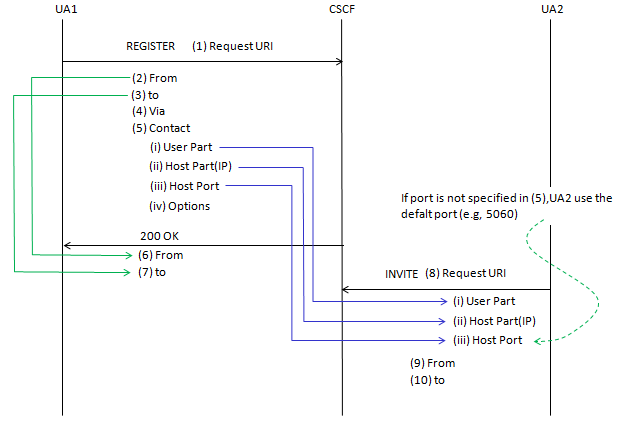
REGISTER / INVITE
This diagram provides an important bridge between registration and session initiation. It shows how the network remembers where to find a user after the user has registered. A practical way to understand this flow is to follow the lifecycle of an address, starting from the point where it is declared in aREGISTER message and continuing to the point where it is reused
in an INVITE. This makes the call flow much easier to interpret
during troubleshooting because it shows how user identity, registered reachability,
and later request routing are all linked together.
1. The Principle of Dialog Continuity
The observation that(2) is the same as (6) and
(3) is the same as (7) reaches the core of SIP
design. Unlike a physical letter, where the To and From addresses on the
envelope swap when the recipient replies, SIP headers identify the session,
not the packet direction.
The From and To headers, together with their tags,
act as a session identifier. They remain logically consistent so that the
User Agent can inspect an incoming message and immediately determine which
ongoing conversation it belongs to.
In a 200 OK response, the From and
To headers are mirrored from the original request. This is the
mechanism that allows a device to associate the response with the request it
sent earlier.
2. Practical Meaning: The Contact as a Routing Bridge
The blue lines in the diagram illustrate one of the most important practical links in IMS. TheContact header carried in a
REGISTER message later becomes the basis for the
Request-URI used in a subsequent INVITE.
Registration Phase (Mapping the Identity)
When UA1 registers, it tells the CSCF that it is User A according to theFrom and To identity, but that it can actually be
reached at the specific address carried in the Contact header.
The Contact header contains the user part, the host part such as
an IP address, and the host port. If the port is omitted, the default SIP
port is typically assumed.
Invite Phase (Using the Map)
When UA2 wants to call UA1, the CSCF checks UA1’s registered information and uses it to build the routing target for the new request. TheRequest-URI in the INVITE is populated using
the user, IP address, and port that UA1 previously provided in its
Contact header. This is how the network converts logical
identity into an actual delivery address.
From a troubleshooting perspective, if a user can place calls but cannot
receive them, a common reason is that the registered
Contact address is no longer valid or is hidden behind NAT in a
way the CSCF cannot correctly route.
3. Addressing Comparison Cheat Sheet
|
Address Type |
Practical Role |
During REGISTER |
During INVITE |
|---|---|---|---|
|
From |
Identity |
The user registering |
The caller, or A-Party |
|
To |
Target Identity |
Usually the same as From for self-registration |
The recipient, or B-Party |
|
Contact |
GPS Coordinates |
Here is my current IP address and port |
Send future messages here |
|
Request-URI |
Routing Path |
The domain of the registrar |
The registered IP address of the recipient |
Troubleshooting Tip: The Dead Air Mystery
If anINVITE reaches the phone, but the phone’s
200 OK does not reach back to the caller, check the
Via and Contact headers in the registration logs.
If the phone registered with a private IP address that the core network
cannot route to, the return path was effectively broken from the beginning.
According to 3GPP 34 229-1 V10.2.0 (2013-07) A.1
| REGISTER | ||
|
Header/param |
Value/remark |
Ref |
|
Request-URI |
|
RFC 3261 |
| From |
|
RFC 3261 |
| To |
|
RFC 3261 |
|
Contact Feature Param |
|
|
According to 3GPP 34 229-1 V10.2.0 (2013-07) A.2.9
| INVITE (MT) | ||
|
Header/param |
Value/remark |
Ref |
|
Request-URI |
|
RFC 3261 |
| From |
|
RFC 3261 |
| To |
|
RFC 3261 |
|
Contact |
|
|
SUBSCRIBE / NOTIFY
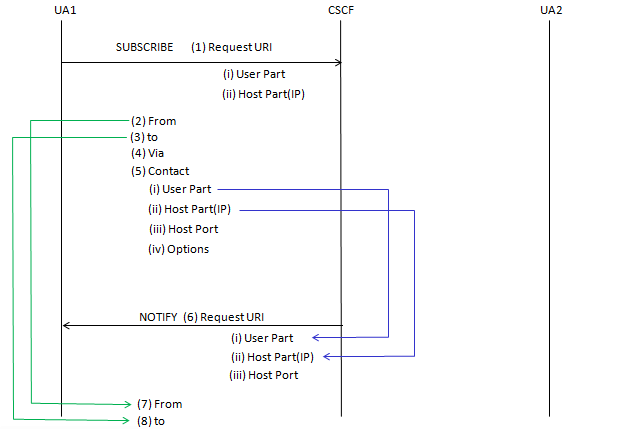
These diagrams extend the same SIP addressing logic from basic session setup into service monitoring throughSUBSCRIBE and
NOTIFY, and into device reachability through
REGISTER. The main idea is that SIP headers should not be viewed
simply as direction markers for individual packets. Instead, they act as a
persistent anchor for dialog identity, allowing the network and the user
equipment to keep track of which session a message belongs to, while separate
routing fields determine where the message should physically go. This is why
the same addressing principles continue to appear across registration,
subscription, notification, and call delivery flows.
The Principle of Persistent Identity
The fact that(2) is the same as (7) and
(3) is the same as (8) in a
SUBSCRIBE/NOTIFY flow is central to dialog state
management.
The From and To headers define the roles of the
dialog at the moment it is created. The From header identifies
the dialog initiator, which is UA1, and the To header identifies
the target, which is UA2.
Even when the network later sends a NOTIFY, and that message
physically travels from the CSCF toward UA1, the headers do not swap. This
consistency allows the User Agent to recognize that the notification belongs
to the same subscription dialog that it created earlier.
Reachability: The Contact to Request-URI Bridge
TheREGISTER/INVITE diagram shows one of the most
practical handoffs in IMS. The network uses the
Contact header to bridge the gap between user identity and
physical location.
During registration, the User Agent provides its user part, host part such as
the IP address, and host port in the Contact header. This is the
device telling the CSCF that it is currently reachable at that specific SIP
socket.
When another party later calls that user, the CSCF looks up the stored
registration data. It then constructs the Request-URI of the new
INVITE using the same IP address and port information that was
previously learned from the Contact header.
From a troubleshooting point of view, if an INVITE fails with a
timeout, one of the first things to verify is the
Request-URI. If it contains an IP address or port that does not
match the device’s actual current location, the registration record may be
stale, unreachable, or corrupted.
Practical Summary for Technical Analysis
|
Header Type |
Role in Dialog |
Practical Impact |
|---|---|---|
|
From / To |
Dialog Anchor |
Ensures that messages such as |
|
Contact |
Dynamic Location |
Used by the CSCF to build the |
|
Request-URI |
Next-Hop Routing |
The primary address used by proxies to move the message to the recipient’s current device. |
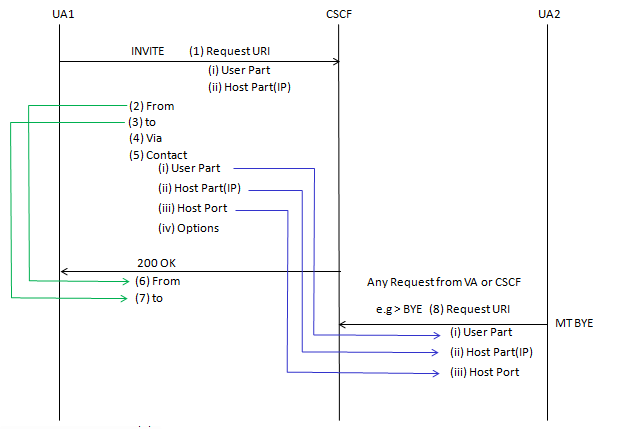
INVITE / BYE(MT)
These diagrams extend the same SIP addressing logic from basic session setup into service monitoring throughSUBSCRIBE and
NOTIFY, and into device reachability through
REGISTER. The main idea is that SIP headers should not be viewed
simply as direction markers for individual packets. Instead, they act as a
persistent anchor for dialog identity, allowing the network and the user
equipment to keep track of which session a message belongs to, while separate
routing fields determine where the message should physically go. This is why
the same addressing principles continue to appear across registration,
subscription, notification, and call delivery flows.
The Principle of Persistent Identity
The fact that(2) is the same as (7) and
(3) is the same as (8) in a
SUBSCRIBE/NOTIFY flow is central to dialog state
management.
The From and To headers define the roles of the
dialog at the moment it is created. The From header identifies
the dialog initiator, which is UA1, and the To header identifies
the target, which is UA2.
Even when the network later sends a NOTIFY, and that message
physically travels from the CSCF toward UA1, the headers do not swap. This
consistency allows the User Agent to recognize that the notification belongs
to the same subscription dialog that it created earlier.
Reachability: The Contact to Request-URI Bridge
TheREGISTER/INVITE diagram shows one of the most
practical handoffs in IMS. The network uses the
Contact header to bridge the gap between user identity and
physical location.
During registration, the User Agent provides its user part, host part such as
the IP address, and host port in the Contact header. This is the
device telling the CSCF that it is currently reachable at that specific SIP
socket.
When another party later calls that user, the CSCF looks up the stored
registration data. It then constructs the Request-URI of the new
INVITE using the same IP address and port information that was
previously learned from the Contact header.
From a troubleshooting point of view, if an INVITE fails with a
timeout, one of the first things to verify is the
Request-URI. If it contains an IP address or port that does not
match the device’s actual current location, the registration record may be
stale, unreachable, or corrupted.
Practical Summary for Technical Analysis
|
Header Type |
Role in Dialog |
Practical Impact |
|---|---|---|
|
From / To |
Dialog Anchor |
Ensures that messages such as |
|
Contact |
Dynamic Location |
Used by the CSCF to build the |
|
Request-URI |
Next-Hop Routing |
The primary address used by proxies to move the message to the recipient’s current device. |
From / To for whole VoLTE Sequence
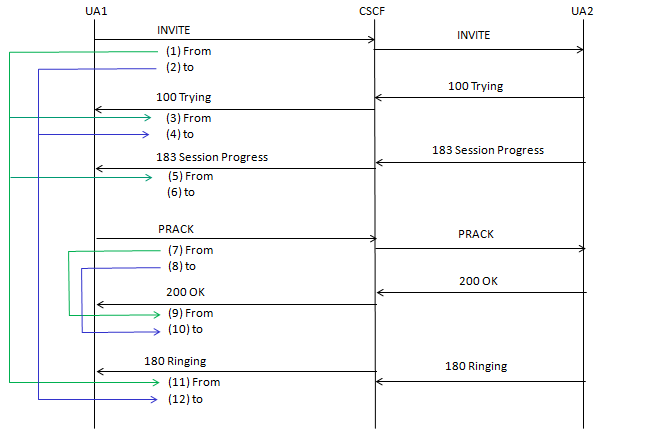
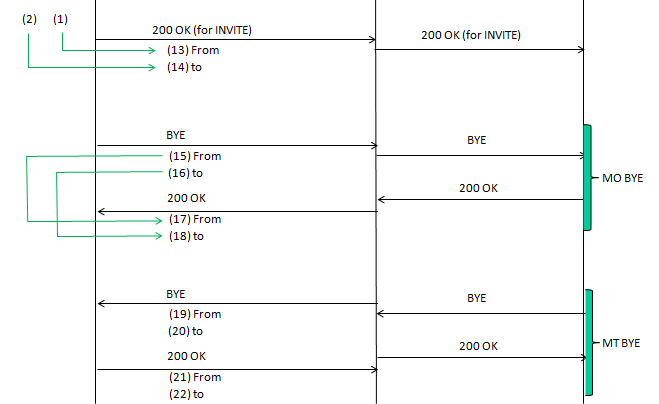
The diagrams shown below illustrate a fundamental principle of the Session Initiation Protocol (SIP) used in VoLTE. They show how theFrom and To headers behave throughout the lifecycle
of a call, or dialog.
In IMS (IP Multimedia Subsystem), these headers do not just identify the
parties. They also maintain the logical direction of the session, even when
the physical direction of the messages changes.
1. The Request Phase (The Initial "From/To")
When UA1 (the caller) initiates the call with an INVITE, it sets theFrom and To headers for the entire
conversation.
- From: Identifies UA1, the initiator.
- To: Identifies UA2, the recipient.
PRACK.
2. The Response Phase (Mirroring)
A key rule in SIP addressing is that Responses, such as100 Trying, 183 Session Progress,
180 Ringing, and 200 OK, must mirror the
From and To headers of the Request they are
answering.
-
Even though the message is physically traveling from the CSCF or UA2 back
to UA1, the
Fromheader still points to UA1 and theToheader still points to UA2. - This allows the SIP stack at UA1 to easily match the incoming response to the original request it sent.
3. The BYE Sequence (Reversing Roles)
The second image highlights what happens during session termination. This is where many people get confused, but the logic is consistent.Mobile Originated (MO) BYE
If UA1 hangs up first:
-
BYE (15, 16): Since UA1 is the one sending the new request, the
BYE uses the same
From(UA1) andTo(UA2) established at the start. - 200 OK (17, 18): UA2 responds by mirroring those headers.
Mobile Terminated (MT) BYE
If UA2, the recipient, hangs up first:
-
BYE (19, 20): Here, UA2 is the initiator of this specific request.
In a SIP dialog, the
FromandToheaders for a new request reflect the sender and target of that request. -
Your diagram shows that for the MT BYE, the mapping is swapped compared to
the MO BYE. This indicates that the
Fromheader now identifies UA2 because UA2 is the sender of the BYE.
Summary Table of Header Logic
|
Message Type |
Direction |
From Header |
To Header |
|---|---|---|---|
|
INVITE |
UA1 → UA2 |
UA1 |
UA2 |
|
180 / 200 OK |
UA2 → UA1 |
UA1 |
UA2 |
|
MO BYE |
UA1 → UA2 |
UA1 |
UA2 |
|
MT BYE |
UA2 → UA1 |
UA2 |
UA1 |
Why This Matters for Technical Writing
When documenting these flows, it is important to distinguish between the logical identity, meaning who started the call, and the transaction identity, meaning who started this specific message. In IMS, theTo and From tags, together with a
unique Call-ID, ensure that the CSCF can route packets correctly
even in complex roaming or call-forwarding scenarios.